We have a wide range of products for biometric and rfid card time attendance recording system which are with optional function, the wireless WIFI to connect to networks.
Facial Recognition Attendance Models FacePro1, FacePro4, FacePro7 ,FACEPRO7 PLUS, FA4000 ,FA7000, FA7000 Plus, FA1-H, FA1-PRO (big capacity model), SenseFace 2A( our OEM model FacePro2), FA1000, FA110 (MB10-VL), FA210 , MB360, FA220, FA 2000. Horus E2-FP
And our fingerprint time clocks access controls : TFT900-H , TFT600, F09, SC800
Above models all can be added with optional WIFI.
The OEM zk biometric and rfid cards time attendance and access control devices provide a WiFi module, which can be built-in within the device module or can be externally connected.
Wi-Fi Settings
The Wi-Fi module enables data transmission via Wi-Fi (Wireless Fidelity) and establishes a wireless
network environment. Wi-Fi is enabled by default in the device. If you don’t need to use the Wi-Fi
network, you can toggle the Wi-Fi to disable the button.
Select Wi-Fi Settings on the COMM. Settings interface to configure the Wi-Fi settings.
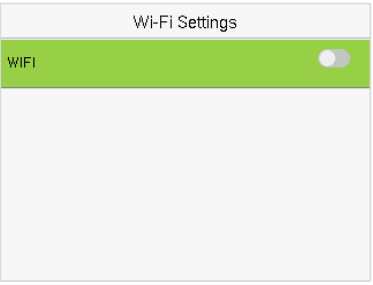
Searching the Wi-Fi Network
Wi-Fi is enabled in the device by default. Toggle the button to enable or disable Wi-Fi.
Once the Wi-Fi is turned on, the device will search for the available Wi-Fi within the network range.
Tap on the required Wi-Fi name from the available list and input the correct password in the password interface, and then press M/OK.
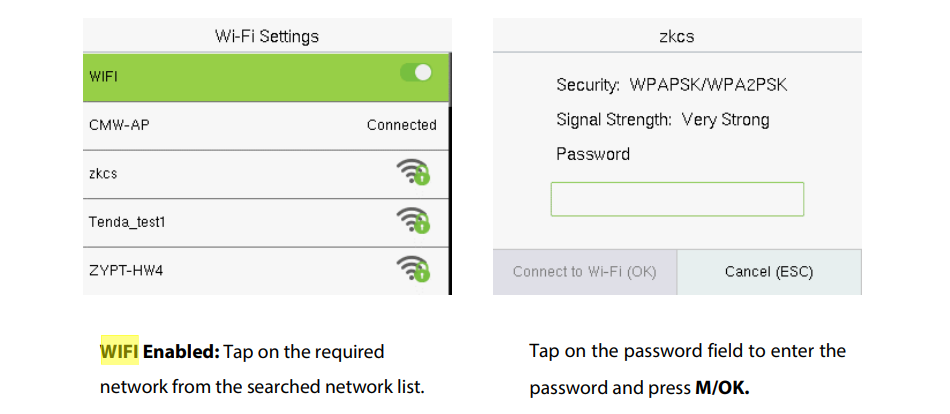
When the Wi-Fi is connected successfully, the initial interface will display the Wi-Fi  logo.
logo.
Adding Wi-Fi Network Manually
The Wi-Fi can also be added manually if the required Wi-Fi does not show on the list.
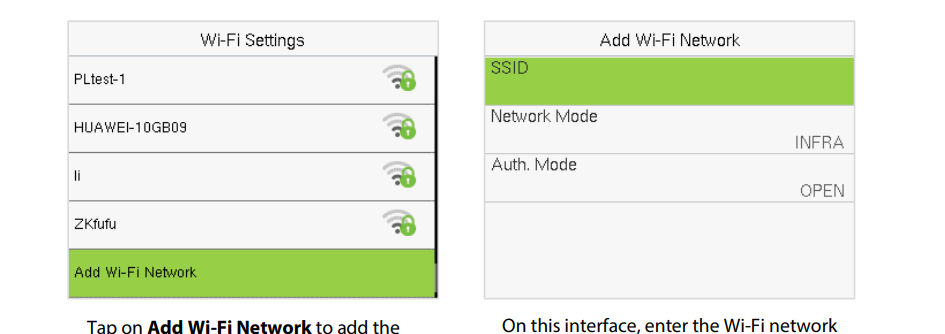
Note: After successfully adding the Wi-Fi manually, follow the same process to search for the added WiFi name.
Advanced Setting
On the Wi-Fi Settings interface, tap Advanced to set the relevant parameters as required.
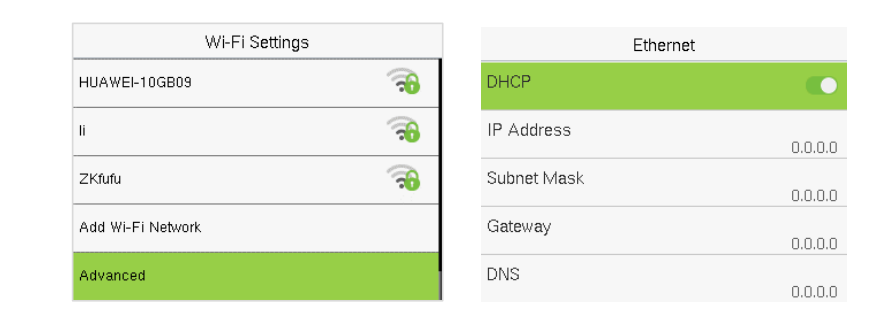
Functions description:

Post time: Jul-07-2026